Workout tracker for iPhone
Your lifts. Your PRs. Your history.
Log every set, see a personal record the moment you hit it, and bring your Strong or Hevy history with you. No cap on workouts, templates or charts.
- Import from Strong or Hevy
- Works offline
- No ads
Less typing between sets. More lifting.
Kilos keeps the numbers so you can keep your head in the workout.
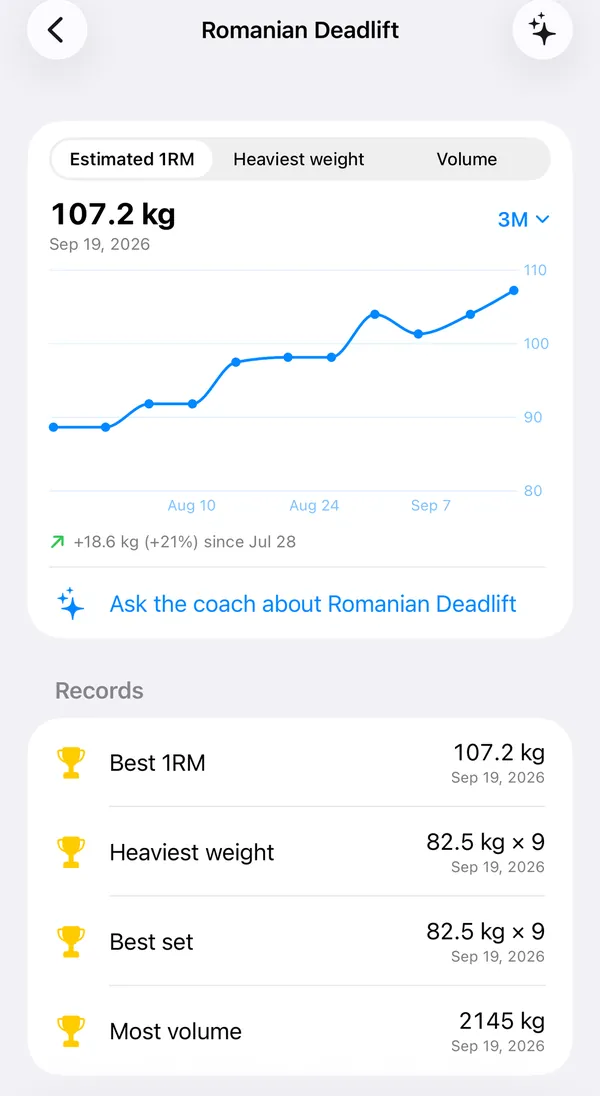
Log a set in one tap
Tap Start when you pick up the bar and Finish when you put it down, or just tick the set off. Last time’s weight and reps sit next to it.
Rest that counts itself
The rest timer starts when the set ends. Rest longer than you planned and you see by how much, right under the set.
Records as they happen
Lift heavier than ever, or more reps than ever at a weight, and the set is marked as a record the moment you log it, with what you beat and by how much.
Machine busy? Swap it
Tap Machine busy for exercises that train the same muscles. With Kilos Pro, the coach adds its picks and a reason for each.
AI coach
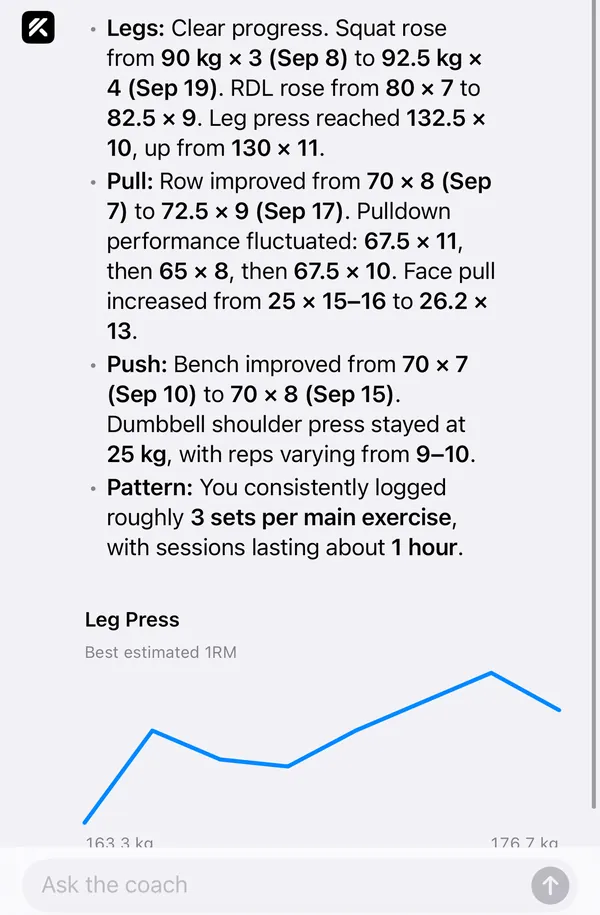
A coach that has read your recent workouts.
Ask how your lifts are going and the answer comes with your own numbers: the weights, reps and rests you logged. It can plan a week around your goal and the equipment your gym has, and suggest a swap when a machine is taken.
The coach is part of Kilos Pro and your first 5 questions are free. It is off until you turn it on, and the app shows what is sent before you do.
Progress
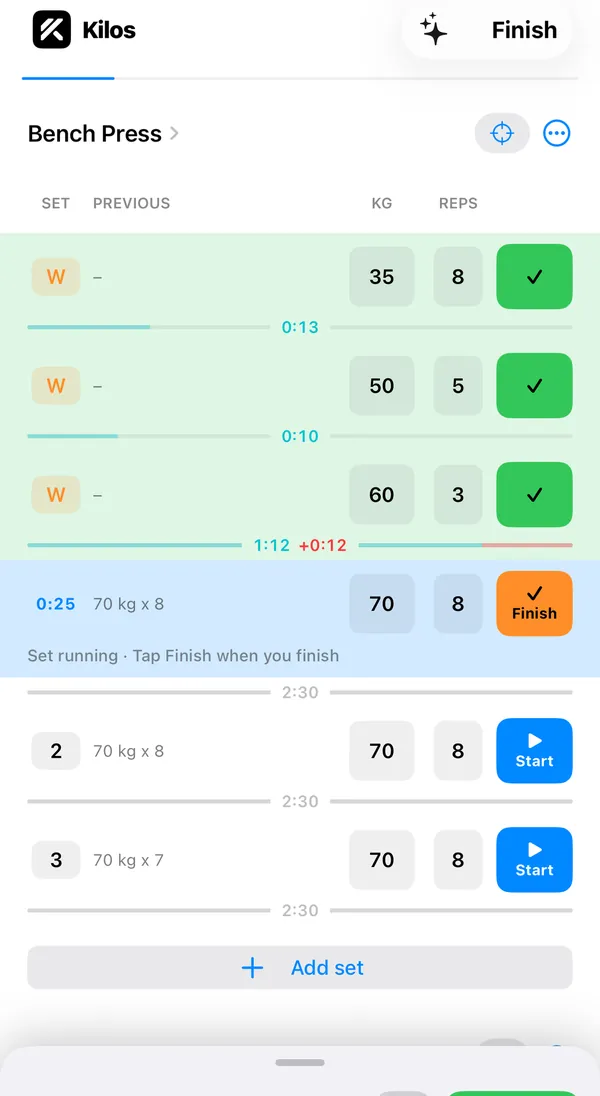
Watch the numbers climb.
Every exercise has its own chart, free: estimated one rep max, heaviest weight and volume, back to your first workout. Each set shows last time’s weight and reps next to it, so you know the number to beat.
The estimate uses the Epley formula, the same one as our free one rep max calculator.
Train together
Bring a friend. Log for both of you.
Invite friends to a live workout where everyone sees whose turn it is and the sets logged. Training with someone who does not have the app? Log their sets too and send them the workout afterwards.
Your workouts stay private until you choose to share one.
- You80 kg × 8Your turn
- Sam60 kg × 10Done
- Tim, logged by you50 kg × 10Next
Switching
Bring your history from Strong or Hevy.
Your old workouts sit next to the new ones, so your records and charts start where you left off.
- Export your workouts as a CSV file in Strong or Hevy.
- In Kilos, open Settings, then Import & export.
- Choose Import from Strong or Import from Hevy and pick the file.
Privacy
Your training log is yours.
- No ads, no selling data. We do not sell data, show ads or share it with anyone else.
- Private by default. A workout is only seen by others if you choose to share it.
- The coach asks first. Nothing goes to the AI coach until you turn it on.
- Leave any time. Export every set as CSV, or delete your account and its data from the app.
The details are in the privacy policy.
Free in Kilos
Charts, unlimited templates and every body measurement, free. In Strong and Hevy, parts of these are paid features.
Logging, templates, charts, measurements and both calculators are free in Kilos. The AI coach is Kilos Pro: your first 5 questions are free, then it is a subscription.
| Feature | Kilos | Strong | Hevy |
|---|---|---|---|
| Workout templates | FreeNo limit | Partly free1Free version: 3 routines; more with Strong PRO | Partly free2Free version: 4 routines; more with Hevy Pro |
| Exercise charts | FreeEvery exercise, back to your first workout | Partly free3,4Strong's help centre lists the Charts tab as Strong PRO; the Records and History tabs are free | Partly free2,5Free version: up to 3 months of history; all time with Hevy Pro |
| Body measurements | FreeAll 18: weight, body fat, calories and 15 body parts | Partly free6Weight, body fat and calories free; Strong's help centre lists body part measurements as Strong PRO | Partly free7Free version: body weight and waist; the rest with Hevy Pro |
| Plate calculator | Free | Paid tier8Strong's help centre lists it as a Strong PRO feature | Free9 |
| Warm-up calculator | Free | Paid tier10Strong's help centre lists it as a Strong PRO feature | Paid tier2Hevy Pro |
| Custom exercises | FreeNo limit | Free11Strong's help centre (2021) describes creating them with no limit or PRO mentioned | Partly free12Free version: 7; more with Hevy Pro |
| CSV export | Free | Free13Strong's help centre (2021) describes it with no PRO mentioned | Free14 |
| Apple Watch app | Not yet | Free1 | Free5 |
| Supersets | Not yet | Free1 | Free5 |
| RPE tracking | Not yet | Free4On strong.app's feature list | Free15 |
Workout templates
Exercise charts
Body measurements
Plate calculator
Warm-up calculator
Custom exercises
CSV export
Apple Watch app
Supersets
RPE tracking
Competitor details from Strong's App Store listing, strong.app and help.strongapp.io, and from Hevy's help centre (help.hevyapp.com), read 15 October 2026. Features and prices may have changed since.
The Kilos column was checked against the app on 15 October 2026.
- Strong, App Store listing (US), read 15 October 2026↑
- Hevy, Help centre: Hevy Pro Subscription, what does it include?, read 15 October 2026↑
- Strong, Help centre: About Exercise Detail Screen, read 15 October 2026↑
- Strong, strong.app home page, read 15 October 2026↑
- Hevy, Help centre: 2026 Features Guide, read 15 October 2026↑
- Strong, Help centre: How to add Measurements, read 15 October 2026↑
- Hevy, Help centre: switching from Pro to the free version, read 15 October 2026↑
- Strong, Help centre: About Plate Calculator, read 15 October 2026↑
- Hevy, Help centre: How to use the Plate Calculator, read 15 October 2026↑
- Strong, Help centre: Warm-up calculator, read 15 October 2026↑
- Strong, Help centre: How do I create a custom exercise?, read 15 October 2026↑
- Hevy, Help centre: Exercise Library and Custom Exercises, read 15 October 2026↑
- Strong, Help centre: Can I export my workout data?, read 15 October 2026↑
- Hevy, Help centre: Exporting Your Data from Hevy, read 15 October 2026↑
- Hevy, Help centre: Workout Settings Preferences, read 15 October 2026↑
Free lifting calculators
The same math the app uses, in your browser. No account needed.
Questions
Is Kilos free?
Logging workouts, your history, templates, charts, measurements, imports and training with friends are free. The AI coach is Kilos Pro: your first 5 questions to the coach are free, then it needs a subscription, as do Plan with AI and the coach's Machine busy picks. The price is shown before you pay; on this website the yearly plan starts with three days free.
Is Kilos on iPhone and Android?
Kilos is built for iPhone and is not in the App Store yet. Join the iPhone tester list and you get the TestFlight link when the test opens. There is an Android app that uses the same account, but it is not in Google Play yet.
Can I import my workouts from Strong or Hevy?
Yes. Export your history as a CSV file in Strong or Hevy, then in Kilos open Settings, Import & export, and choose Import from Strong or Import from Hevy. Your workouts and sets come across, and the steps to get the file are shown in the app.
Can I export my data?
Yes. Settings, Import & export, Export all workouts gives you a CSV file with one row per set as it was done: the exercise, weight, reps, and when the set started and ended. You can also delete your account and all its data from the app.
What does the AI coach see?
Nothing until you turn it on. Before you do, the app shows what would be sent and to whom. Once it is on, the coach gets the exercises, sets, reps and weights you log, your recent workouts, body measurements you entered and your gym's equipment list. Turn it off in Settings at any time. We do not sell data or show ads.
Does it work without a connection?
Yes. Logging a workout happens on your phone and needs no connection; anything you log offline syncs the next time you have signal. The coach needs a connection, because it runs on our server.
Something else? See Support or mail [email protected].
Lift. Log. Get stronger.
Answer six or seven questions and Kilos builds your first week. Then log every set and watch your records climb.